Word (docx) by Anthropic
Creates, reads and edits Word documents: styles, table of contents, tables, comments and tracked changes.
By Anthropic (opens in a new tab) · official
When to use it
- When the deliverable is a .docx.
- To edit a Word file with tracked changes or comments.
When to avoid it
- For Google Docs or final PDFs.
Recommendations
- Ask for heading styles (Heading 1, 2) so the table of contents works.
- Check the file in Word or LibreOffice before sending it.
Risks and permissions
- Runs Python and Node scripts, and can install the docx package from npm.
- Uses LibreOffice and Poppler if they’re available; without them some features fail.
Install it
With BibliotecaPrompts Recommended
-
Connect bp, just once. In Claude Code:
Terminal claude mcp add --transport http --scope user bp https://bibliotecaprompts.com/mcpAnother harness? How to connect it in yours.
-
Ask your agent for it:
Ask like this Instala con bp la skill docx

- Downloads the version we tested (
e4bb5d9), 61 files. - Checks each one against its SHA-256 fingerprint: if anything changed, it installs nothing.
- Only the skill and its license: no hooks or extra servers.
- Puts it in your harness’s folder, the project’s or your own.
Other ways, from the source
Claude Code
Installs docx, pdf, pptx and xlsx together.
/plugin marketplace add anthropics/skills
/plugin install document-skills@anthropic-agent-skills
claude.ai Claude Desktop
It’s already included: turn on code execution and create it from the chat.
Codex CLI Cursor Gemini CLI OpenCode


With the npx skills installer, which asks you which agent to install it in.
npx skills add anthropics/skills --skill docxBefore installing, read its SKILL.md. Another harness? Where skills go in each one.
Our test
The task: Convert informe.md into informe.docx with an automatic table of contents, Heading 1 and Heading 2 styles and page numbers.
Passes if: informe.docx opens, uses the heading styles, includes a table-of-contents field and keeps accents and “ñ”.
-
Claude Opus 5.5Passes
Converted informe.md: Heading 1 and 2 styles, a table-of-contents field, “Página X de Y” (Page X of Y) in the footer, and the ñ, accents and «» quotes intact.
- 198 s
- 1.1M tokens
- $0.72
- Nov 24, 2026
What it produced
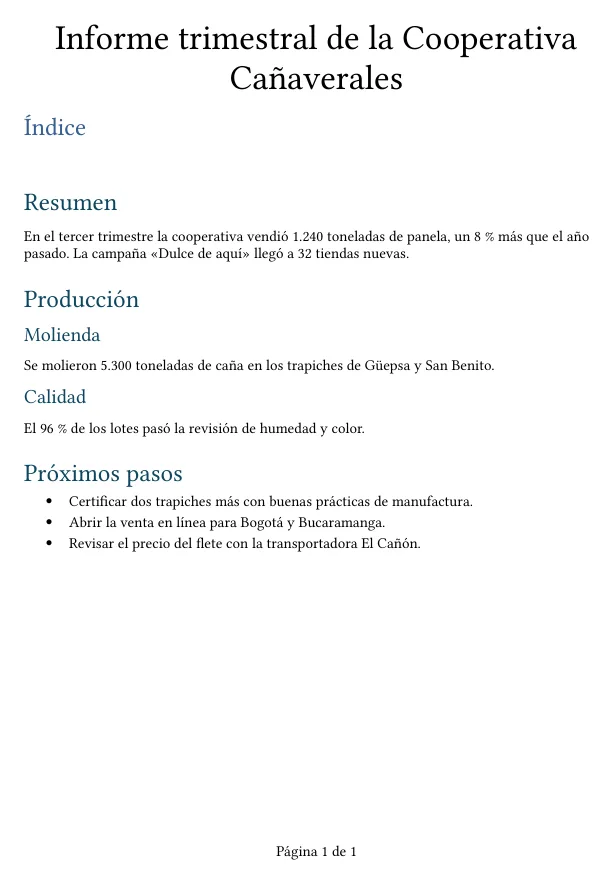
Documento Word: informe.docx
What the agent answered
Creé `informe.docx` a partir de `informe.md`. Tiene índice automático, estilos Título 1 y Título 2 y número de página. No pude verlo renderizado: LibreOffice no generó el PDF dentro del sandbox y tampoco mostró ningún error. Lo comprobé leyendo el archivo de vuelta y revisando su XML. - **Estilos:** el `#` inicial quedó como título del documento, cada `##` como Título 1 y cada `###` como Título 2. Son los estilos de encabezado propios de Word, que en un Word en español aparecen como «Título 1» y «Título 2». - **Índice:** va al principio con el encabezado «Índice» e incluye los niveles 1 y 2, con enlaces a cada sección. Lo dejé configurado para que se actualice al abrir el archivo. Word suele preguntar si quiere actualizar los campos: diga que sí y el índice se llena. Si no se llena, haga clic derecho sobre él y elija «Actualizar campos». - **Número de página:** en el pie, centrado, con el formato «Página X de Y». Lo convertí con pandoc porque la red bloqueó la instalación de la librería que pensaba usar. En la carpeta solo quedan `informe.md` (sin cambios) e `informe.docx`. Borré los archivos auxiliares que usé. -
Claude Sonnet 5.5Passes
informe.docx has Heading 1 and 2 styles, a table-of-contents field and page numbers in the footer, with accents, ñ and «» quotes intact. This run’s trace is incomplete: we don’t show its time or cost.
- Nov 24, 2026
What it produced
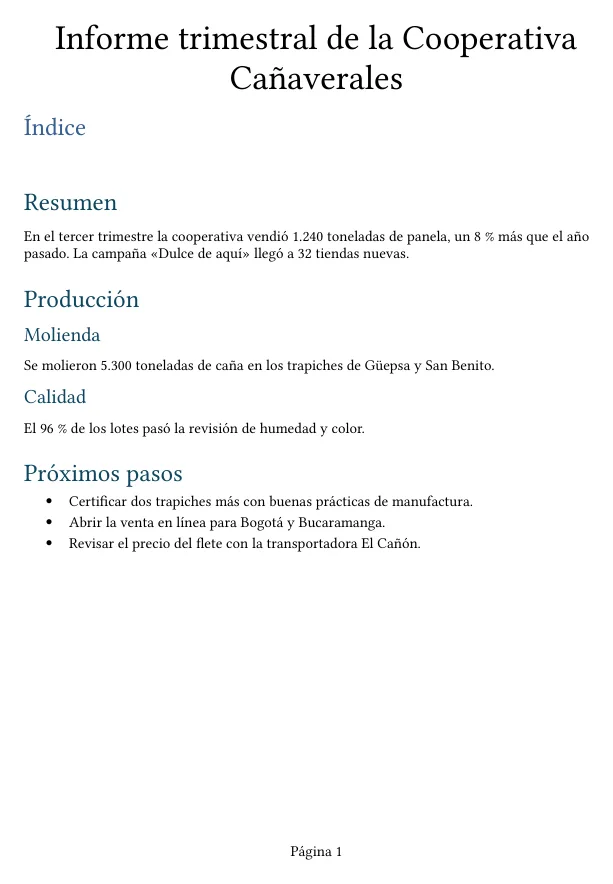
Documento Word: informe.docx
What the agent answered
El proceso de LibreOffice que lancé para renderizar el documento a PDF llegó a su límite de tiempo y se detuvo. Ya lo había dado por perdido al cerrar el trabajo, y no lo reinicio.

Por eso no hay una comprobación visual del `informe.docx`. Solo verifiqué que el ZIP es válido, que el XML está bien formado y que pandoc lo lee bien. Abre el archivo en Word y revisa el índice y el pie de página. Si el índice sale vacío, pulsa F9 sobre él.

No quedó ningún archivo extra en la carpeta, solo `informe.md`, `informe.docx` y `.claude`.
Each run: Claude Code with the skill installed, no network and in a sandbox, at version e4bb5d9 of the repository. The verdict comes from a review that opens the files it left, not just its answer.