Excel (xlsx) by Anthropic
Creates and edits Excel sheets with real formulas, not pasted values, and recalculates them.
By Anthropic (opens in a new tab) · official
When to use it
- When the deliverable is an .xlsx with formulas and formatting.
- To clean up and organize a CSV in a sheet.
When to avoid it
- For Google Sheets or a report in Word.
Recommendations
- Ask it to use formulas (SUMIFS, etc.) so the sheet stays live.
- Avoid XLOOKUP and FILTER: the skill doesn’t use them because LibreOffice doesn’t recalculate them.
Risks and permissions
- Runs Python and LibreOffice to recalculate; can install libraries if they’re missing.
Install it
With BibliotecaPrompts Recommended
-
Connect bp, just once. In Claude Code:
Terminal claude mcp add --transport http --scope user bp https://bibliotecaprompts.com/mcpAnother harness? How to connect it in yours.
-
Ask your agent for it:
Ask like this Instala con bp la skill xlsx

- Downloads the version we tested (
e4bb5d9), 53 files. - Checks each one against its SHA-256 fingerprint: if anything changed, it installs nothing.
- Only the skill and its license: no hooks or extra servers.
- Puts it in your harness’s folder, the project’s or your own.
Other ways, from the source
Claude Code
Installs docx, pdf, pptx and xlsx together.
/plugin marketplace add anthropics/skills
/plugin install document-skills@anthropic-agent-skills
claude.ai Claude Desktop
It’s already included: turn on code execution and create it from the chat.
Codex CLI Cursor Gemini CLI OpenCode


With the npx skills installer, which asks you which agent to install it in.
npx skills add anthropics/skills --skill xlsxBefore installing, read its SKILL.md. Another harness? Where skills go in each one.
Our test
The task: With ventas.csv, create ventas.xlsx with a “Datos” sheet and a “Resumen” sheet with the total by region using SUMIFS and currency formatting.
Passes if: The summary cells are formulas (they start with =), there are no formula errors and the totals match a separate calculation.
-
Claude Opus 5.5Passes
Created Datos and Resumen with SUMIFS by region, SUM for the total and currency formatting; recalculated, it gives 9,310,000, same as the separate calculation, with no errors.
- 94 s
- 418.9K tokens
- $0.39
- Nov 24, 2026
What it produced
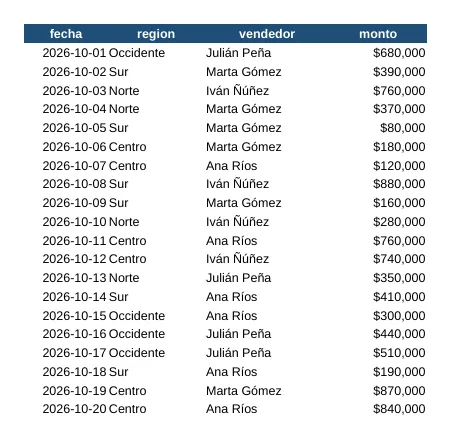
Sheet 1 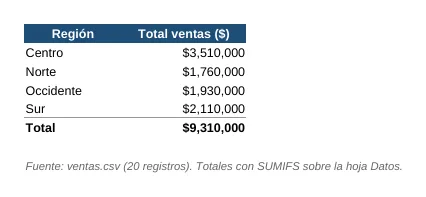
Sheet 2
What the agent answered
Creé `ventas.xlsx` con las dos hojas, pero no pude recalcular las fórmulas aquí: LibreOffice no logró arrancar en este entorno (dio un error de perfil, probablemente por el sandbox). Las fórmulas están bien escritas, pero aún no tienen valores guardados. Excel las calcula al abrir el archivo; otros visores o pandas las verán vacías hasta entonces. - **Datos:** las 20 filas de `ventas.csv` con sus columnas originales (`fecha`, `region`, `vendedor`, `monto`). Las fechas son fechas reales y el monto tiene formato de moneda. La fila de encabezado queda fija y tiene filtros. - **Resumen:** una fila por región (Centro, Norte, Occidente, Sur) con `=SUMIFS(Datos!$D$2:$D$21,Datos!$B$2:$B$21,A2)`, una fila de Total con `SUM` y una nota con la fuente de los datos. Formato `$#,##0`. Sumé el CSV directamente para que puedas comparar al abrirlo en Excel: Centro $3.510.000, Norte $1.760.000, Occidente $1.930.000, Sur $2.110.000, total $9.310.000. En la carpeta quedan `ventas.csv` (sin cambios) y el nuevo `ventas.xlsx`. Usé un script auxiliar para generarlo y lo borré al terminar. -
Claude Sonnet 5.5Passes
Created Datos and Resumen with SUMIFS by region and currency formatting; recalculated, it matches the CSV (9,310,000) with no formula errors.
- 25 s
- 324.7K tokens
- $0.15
- Nov 24, 2026
What it produced
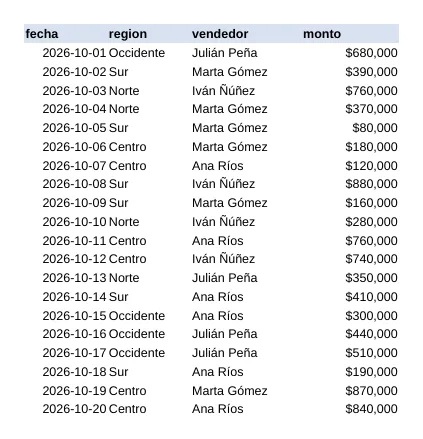
Sheet 1 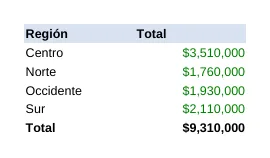
Sheet 2
What the agent answered
Creé `ventas.xlsx`, pero no pude recalcularlo con LibreOffice, así que las fórmulas aún no tienen valores guardados.

- **Datos:** las 20 filas de `ventas.csv`. La fecha es una fecha real, `monto` tiene formato de moneda y la fila de encabezado está fija.
- **Resumen:** una fila por región (Centro, Norte, Occidente, Sur). Cada total usa `SUMIFS` sobre `Datos` con formato `$#,##0`. Abajo hay una fila de Total con `SUM`.
- **Recalculo:** `recalc.py` falló con «LibreOffice did not create a usable profile». Probablemente lo bloquea el sandbox, y no lo eludí. Excel calculará las fórmulas al abrir el archivo, pero algunos visores previos mostrarán celdas vacías hasta entonces.
- **Verificación:** sumé el CSV aparte con Python. Los totales que deberían salir son Centro 3.510.000, Norte 1.760.000, Occidente 1.930.000 y Sur 2.110.000. El total general es 9.310.000. No comprobé que las fórmulas den esas cifras.

Archivos en la carpeta: `ventas.csv` (original) y `ventas.xlsx`. Borré el script temporal.
Each run: Claude Code with the skill installed, no network and in a sandbox, at version e4bb5d9 of the repository. The verdict comes from a review that opens the files it left, not just its answer.